
Spring-Boot整合mybatis步骤
添加数据库以及mybatis maven依赖
jdbc:mybatis包含了spring-boot-starter-jdbc可以不用添加
1 | <!-- mybatis --> |
编写mapper接口和相应的mapper xml文件
UserMapper.java
如果不添加@Mapper注解可以在SpringMybatisApplication.java也就是springboot启动类添加@MapperScan(“cn.kil.springboot_mybatis.mapper”)注解指定mapper接口的扫描路径。
1 | package cn.kil.springboot_mybatis.mapper; |
UserMapper.xml
1 |
|
附加相应的实体类信息User
1 | package cn.kil.springboot_mybatis.pojo; |
编辑spring配置文件application.properties添加数据库以及Mapper xml信息
1 | spring: |
测试

附加项目的文件目录信息
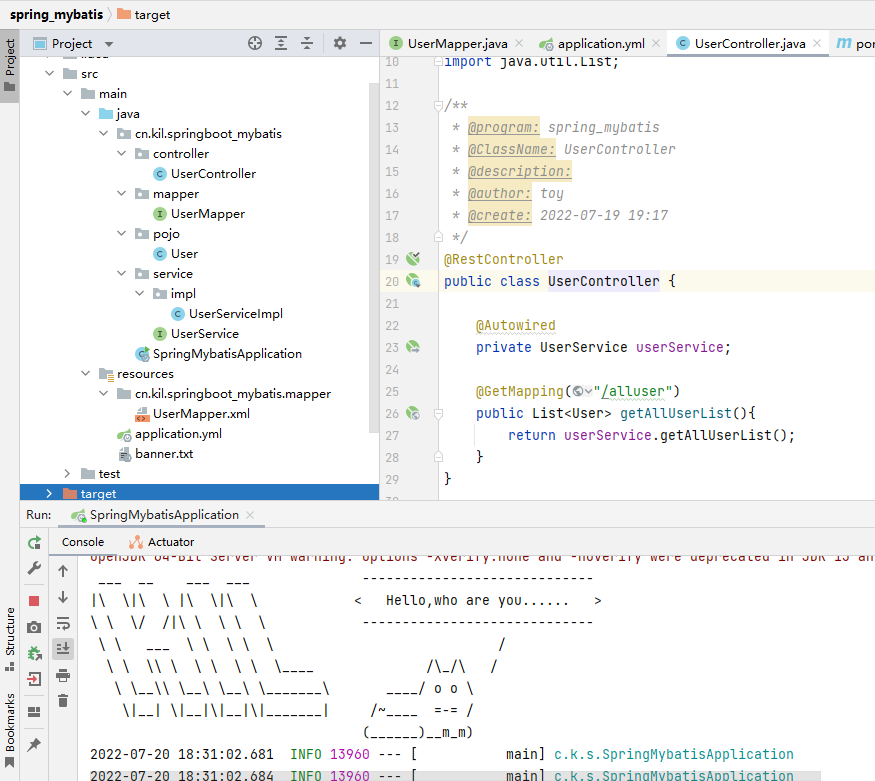
总结
- 添加数据库连接信息
- 设置@Mapper注解或者指定@MapperScan注解扫描的包路径
- 指定mapper-locations的路径
本博客所有文章除特别声明外,均采用 CC BY-NC-SA 4.0 许可协议。转载请注明来源 kil-Blog!
相关推荐
2022-07-17
JAVA之自动装配
级联属性赋值 在的子元素中,为它所依赖的Bean的属性进行赋值,这就是所谓的”级联属性赋值”。 使用级联属性赋值注意事项: java类中必须有setter方法 java类中必须有无参构造器(默认存在) 依赖其他Bean的类中,必须提供一个它依赖的Bean的getXxx()方法 Spring在Bean与Bean之间建立依赖关系的行为成为装配。Spring的IOC容器虽然强大,但本身不过是一个空壳,需要主动将Bean放进去,并告诉它Bean和Bean之间的依赖关系,才能按照我们的要求完成装配工作。 spring通过注解实现自动装配的步骤如下: 1.引入依赖 2.开启组件扫描 Spring默认不使用注解装配Bean。因此在Spring XML配置中,通过元素开启Spring Beans的自动扫描功能,即在类上使用了@Component注解,就将该类装配到容器中。 123456789101112<?xml version="1.0" encoding="UTF-8"?><beans...
2024-03-28
RequestParam,PathParam,PathVariable等注解区别
@RequestParam 和 @PathVariable 注解是用于从request中接收请求的,两个都可以接收参数,关键点不同的是@RequestParam 是从request里面拿取值,而 @PathVariable 是从一个URI模板里面来填充 @RequestParam看下面一段代码: 1http://localhost:8080/springmvc/hello/101?param1=10¶m2=20 根据上面的这个URL,你可以用这样的方式来进行获取 12345public String getDetails( @RequestParam(value="param1", required=true) String param1, @RequestParam(value="param2", required=false) String param2){...} @RequestParam 支持下面四种参数 defaultValue...
2022-07-21
Spring-Boot属性绑定
@PropertySourece()my.properties 1name=kil UserService.java 添加@PropertySource(“my.properties”)指定配置文件 引用@Value(“${name}”) 1234567891011121314151617181920212223package cn.kil.springboot_parameter.service;import org.springframework.beans.factory.annotation.Value;import org.springframework.stereotype.Service;/** * @program: springboot_parameter * @ClassName: UserService * @description: * @author: toy * @create: 2022-07-20 19:51 */@Service@PropertySource("my.properties")public class...
2022-07-21
Spring Boot条件注解
...
2024-03-28
Spring Boot项目全局异常处理方式
SpringBoot中,@ControllerAdvice 即可开启全局异常处理,使用该注解表示开启了全局异常的捕获,我们只需在自定义一个方法使用@ExceptionHandler注解然后定义捕获异常的类型即可对这些捕获的异常进行统一的处理。 添加@ControllerAdvice自定义全局异常处理器12345678910111213141516@RestControllerAdvicepublic class GlobalExceptionHandler { //默认全局异常处理 @ExceptionHandler(Exception.class) @ResponseStatus(HttpStatus.INTERNAL_SERVER_ERROR) public ResultData<String> exception(Exception e){ return ResultData.fail(ReturnCode.RC500.getCode(), e.getMessage()); } ...
2024-07-08
Spring Security Oauth2.1基本整合配置
依赖只需要下面的这一个依赖,springboot 版本为 3.3 1234<dependency> <groupId>org.springframework.boot</groupId> <artifactId>spring-boot-starter-oauth2-authorization-server</artifactId></dependency> 授权服务AuthorizationServerConfig配置spring 官方在快速开始里面给出了下面的默认最小配置Spring Authorization...
评论
